At a glance#
Skills: KiCAD, Schematic Design, PCB Layout
- What: Designed a new compact PCB to quickly view the status of a Formula SAE electric racecar.
- How: Used KiCAD to create schematic and layout. Optimized design to protect integrity of CAN and SPI signals and minimize disruptions to the ground plane.
- Why: Allows team members to instantly see the status of each shutdown node (represented by LEDs) without requiring connecting a laptop.
Details#
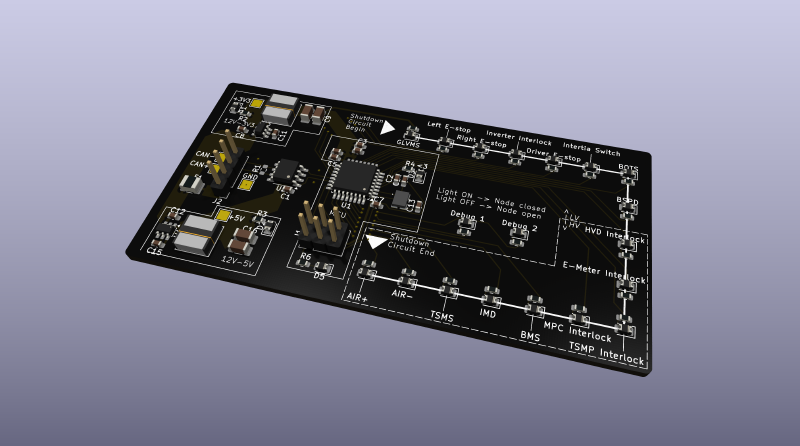
This summer, I officially became the Electrical (and Software) Lead of Olin Electric Motorsports, Olin College’s FSAE Electric team. Each year, the electrical team designs and fabricates over a dozen unique PCBs for use on our vehicle. While I have been on the team for two years, I have never designed a PCB from start to finish. As such, I thought it would be valuable to dedicate some time over the summer to learn how to use KiCAD and design a useful board for our team. Learning PCB design was important so that I can effectively review other team member’s PCB designs and support newer members in the learning process.
From this, the leadership team devised the portable diagnostic PCB project. In addition to myself, all sub-team leads also participated in the same design project to build a sense of accountability and provide fundamental skills for all leads to support their new members. Over the course of about one month, the leadership team spent weekends and afternoons after internships, going from requirements to a final version of the PCB. Design constraints include a 2-layer stack-up, $20 max budget for parts, and must be able to be populated/soldered using the tools that exist at Olin. Additionally, we went through two iterations of both the schematic and layout, which gave us a chance to improve our designs from feedback from our peers.
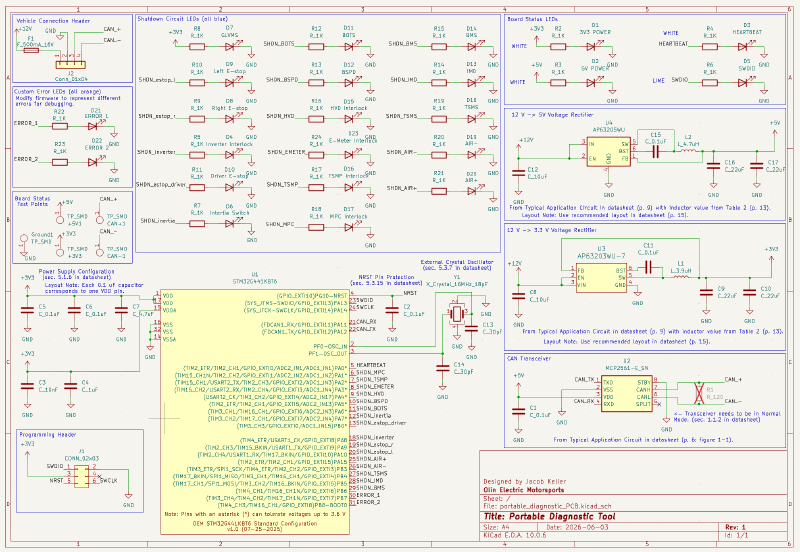
My general approach to this project was to visually represent each shutdown node on our car with an LED that represented the node’s current state (LED on = node closed, LED off = node open). To maximize the pinout of the STM32, I included two additional debug signal LEDs, which can be configured to other fault conditions in firmware. Generally, I am happy with my final schematic design. If I were to do things again, I would consider using an additional IC to control all the LEDs instead of direct GPIO connections.
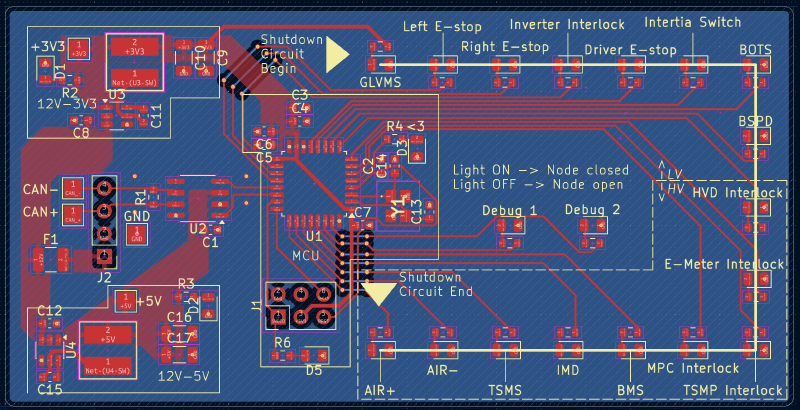
In my layout, I prioritized spacing the LEDs in a logical order, reflecting the actual order of the shutdown nodes on the vehicle. This way, the LEDs provide a logical “at-a-glance” view of which nodes in our shutdown loop are closed. I focused on arranging the components to minimize interruptions to the ground plane, to ensure the return current path was preserved. I ended up interrupting the ground plane in two places, but ensured that the signals routed on the second layer were low-speed (digital on/off). Additionally, I aimed to reduce the trace length of important and high speed signals (CAN, crystal, SWD programming).
Since completing this project, I have identified a number of changes I would make to the layout if I ever make another revision. In particular, I would revise the design of the power conversion blocks to more closely follow the datasheet recommendations. Additionally, I would add co-planar GND traces alongside important signal paths to further improve the return current characteristics of the 2-layer stack-up.